Want clearer MOD APK updates and listing changes? Use the MODDROID app.
Download MODDROID App
Direct APK · Free to use · Version updates and catalog access in one place
MODDROID is a community-driven MOD APK download platform. Many apps and updates may come from users, contributors, or the wider Android modding community. Because MOD APKs are modified third-party files, no platform can honestly guarantee that every package is completely safe, original, or unchanged.
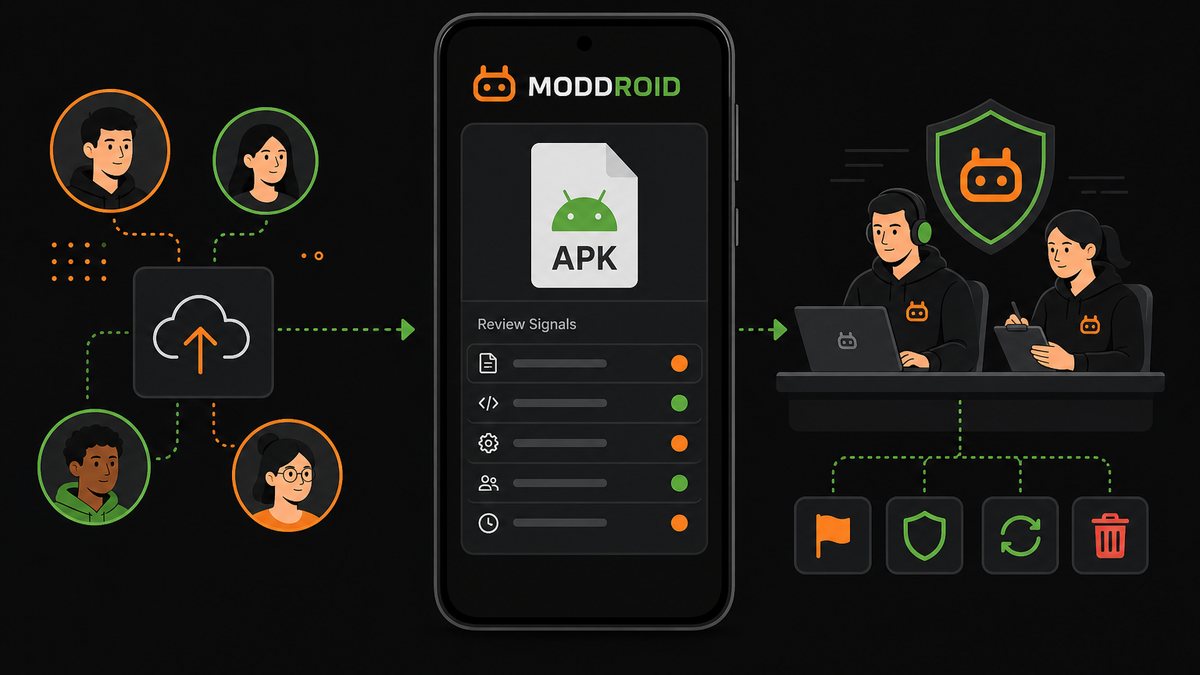
This article is not a general Android safety checklist. It explains how MODDROID handles community-submitted listings: where upload leads come from, what review signals are used, how user reports are triaged, and what actions the team can take when an APK needs correction, replacement, or removal.
Quick overview: MODDROID's listing workflow
- Collect app and update leads from users, contributors, community channels, and internal research.
- Organize each APK into a listing with version, MOD notes, category, and update context.
- Review available package signals such as package name, version, signing clues, and file consistency.
- Track reports about malware warnings, failed installs, broken downloads, and misleading MOD notes.
- Triage credible reports and decide whether to correct, replace, hide, downlist, or remove an APK.
- Use community feedback to improve listings over time instead of treating publishing as a one-time event.
1
▼
MODDROID is not the original developer of most apps in the catalog. It is a MOD APK download platform where app pages, update leads, and issue reports can come from users, contributors, public modding communities, and internal team research.
This model helps the catalog react faster when apps update, MOD features change, or users discover a working build. It also means the platform must treat publishing as an ongoing workflow, not a one-time approval stamp.
The role of the MODDROID team is to organize submissions, check available signals, keep listing information clear, and respond when users report that a file, version, or description needs attention.
2
Package Signals, Signatures, and Source Clues
▼
For many packages, MODDROID can review signals such as package name, version number, app icon, signing information when available, file details, and whether the listing matches the expected app category. These checks help catch obvious mismatches before a listing is promoted more widely.
The important qualifier is when available. MOD APKs are often repackaged, re-signed, or renamed by third parties. Some modified builds intentionally use a different package name so they can install beside the official app.
That is why MODDROID treats these signals as inputs for review, not as absolute proof. A listing can still require follow-up if later user reports contradict the initial package information.
3
How a Listing Moves Through Intake
▼
A MODDROID listing is more than a file link. The team needs enough context to help users understand what the APK is, what version it targets, what MOD behavior is claimed, and what kind of device or Android version may be relevant.
Typical intake checks include:
- Matching the submitted file to the intended app or game page.
- Checking whether the version and MOD notes are specific enough to publish.
- Reviewing file and package clues where they are available.
- Looking for obvious mismatches between the title, category, icon, and claimed features.
- Deciding whether the listing needs extra notes before users start downloading.
This intake step is about building a usable listing, not pretending every modified APK can be fully verified from the outside.
4
MOD Notes, Versions, and Listing Corrections
▼
MOD notes are one of the most common places where a listing needs maintenance. A build may claim premium unlocked, no ads, unlimited money, unlocked levels, region unlocked, or pro features enabled, but those claims can become inaccurate after the original app changes.
When users report that a MOD feature no longer works, the team can review the listing and decide whether the description needs to be corrected, the version should be replaced, or the APK should be removed until a better build is available.
This keeps the article focused on platform maintenance: the goal is not to promise every MOD feature forever, but to keep the listing honest as reports and app updates come in.
5
How User Reports Are Triaged
▼
Not every report means the same thing. A failed install may be a device compatibility issue. A malware warning may be a false positive caused by repackaging or a real reason to remove the file. A broken MOD feature may be caused by a server-side app update.
Reports that usually need faster review include:
- Malware or security warnings from multiple users or tools.
- Unexpected behavior after launch, such as aggressive ads, redirects, or background activity.
- Broken download links, corrupted files, or repeated install failures.
- MOD feature claims that no longer match what the APK actually does.
- Version mismatches, wrong package uploads, or misleading listing information.
The team looks for patterns, supporting details, and severity. More specific reports are easier to act on than one-line complaints.
6
How MODDROID Responds to User Reports
▼
User feedback is part of the platform workflow. MODDROID has team members who monitor reports about malware warnings, suspicious behavior, broken downloads, failed installs, wrong MOD descriptions, and outdated versions.
When a report looks credible, the team can recheck the APK, update the listing, replace the file, add guidance, temporarily hide the listing, downlist it, or remove the APK from public access.
A malware warning is not automatically ignored or treated as harmless. It is a signal for review, and if the file or listing looks risky, misleading, or unreliable, MODDROID can adjust or take it down.
7
Why Issues Can Appear After Publishing
▼
Publishing a listing does not mean every future device, region, Android version, and security tool will behave the same way. Some problems only appear after real users install the APK at scale.
Common post-publish causes include server-side app changes, expired MOD features, Android compatibility differences, regional behavior, re-signed package conflicts, split APK requirements, and antivirus false positives.
This is why MODDROID treats user reports as part of maintenance. A listing can be updated after publishing, and an APK can be removed if later evidence shows it should not stay public.
8
How Users Help Improve Listings
▼
Useful reports help the team act faster. Instead of only saying "this app does not work," users can include the app version, Android version, device model, error message, security warning name, and what happened before the issue appeared.
Reports about malware warnings, suspicious permissions, broken downloads, incorrect MOD notes, outdated versions, and device-specific install errors help MODDROID decide whether to update the listing, replace the APK, add guidance, or remove the file.
FAQ
Where do MODDROID uploads come from?
MODDROID is a community-driven MOD APK platform, so listings and update leads may come from users, contributors, public modding communities, and internal team research before they are organized into app pages.
Does MODDROID manually review every submitted APK?
MODDROID reviews most packages using available signals such as version details, package information, signatures when possible, install behavior, listing consistency, and user reports. Some MOD APKs are renamed, repackaged, or re-signed, so not every signal is always available.
What happens after a malware warning is reported?
The MODDROID team reviews credible malware warnings and related evidence, checks the listing and file where possible, and can update the listing, replace the APK, add guidance, temporarily hide it, or remove it from public access.
Can MODDROID remove an APK after publishing?
Yes. If a listing receives credible reports about malware warnings, suspicious behavior, broken installs, misleading MOD features, or other serious issues, MODDROID can remove or downlist the APK while it is reviewed.
Why can problems appear after an APK was listed?
Problems can appear later because MOD APKs run across many Android versions, regions, devices, and security tools. Server-side app changes, expired MOD features, re-signed packages, or false positives can also appear after publishing.
How can users help improve MODDROID listings?
Users can help by reporting broken downloads, install errors, malware warnings, suspicious permissions, wrong MOD descriptions, outdated versions, and device-specific issues with enough detail for the team to triage.
Use MODDROID for clearer MOD APK listings, updates, and report follow-up
Download MODDROID App
For broader safety guidance, read our Android MOD APK safety guide.